כשל נקודתי אנושי – בינה מלאכותית לא נופלת
למליסה יש 4 בנות , כל בת יש אח כמה ילדים יש למליסה ?
בדקו ב chatgpt למה היה לה קשה לטעות ?
יצירת מצגת על ידי בינה מלאכותית : gamma.app
חלק א
.תרגיל כיתה (לימוד עצמי שימוש בבינה מלאכותית)
מטרת התרגיל : לימוד עצמי של נושא , יצירת טבל השוואה ,עבודה במקביל במספר מסכים עם בינה מלאכותית
(פנה למרצה – לכל שאלה)
תרגיל 1
שימוש ב https://gemini.google.com/
- עליכם לבצע מצגת בנושא מסויים בדוק עזרת בינה מלאכותית
- צור חומר עבור רעיון למוצר או שירות – צורר מלל עבור 3 דפים ותמונה עבור 3 דפים
- לא להשתמש בשלב זה ב notebooklm בסוף תרגיל 2 עושים השוואה גם מול notebooklm
(פנה למרצה – לכל שאלה)
תרגיל 2
- בחלון חדש במקביל איזה כלים יש כיום לבניית מצגת מבוססת A.I
- הצג בתוך טבלה השוואה : שם החברה , שם כלי, תיאור במספר מילים , קישור לכלי , חינם, תשלום נידרש , שפות עברית אנגלית
- בקש מהבינה מלאכותית שיציג לך 3 קישור ותיאור סרטוני למידה בכלי בבינה מלאכותית שבחרת
- למד דרך הסרטון עבודה במצגת (העזר בבינה מלאכותית לפי הצורך ) (ניתן לשמוע את הסרטון דרך הטלפון האישי)
- בנה מצגת עבור תרגיל 1 – הצג למרצה
- צור אותה מצגת גם ב notebooklm
(פנה למרצה – לכל שאלה)
חלק ב : OPENPOSE YOLO
אימון מודל תזכורות חזרה על החומר
https://teachablemachine.withgoogle.com/train
חלק ג : OPENPOSE YOLO
CapCut filter
1 קישורים :
https://docs.ultralytics.com/tasks/pose/#what-are-the-available-ultralytics-yolo11-pose-models-and-their-performance-metrics
https://github.com/Alimustoofaa/YoloV8-Pose-Keypoint-Classification

2 .איך ניתן לנתח את את התמונות
מערכת לזיהוי נפילה אצל גיל שלישי


3. קישור להורדת וידאו
https://y2meta.tube/convert/?videoId=esGZTeb_AiM
|
from ultralytics import YOLO
import cv2
# Define keypoint names as per the model's standard output
keypoint_names = [
"Nose", "Left Eye", "Right Eye", "Left Ear", "Right Ear",
"Left Shoulder", "Right Shoulder", "Left Elbow", "Right Elbow",
"Left Wrist", "Right Wrist", "Left Hip", "Right Hip",
"Left Knee", "Right Knee", "Left Ankle", "Right Ankle"
]
# Load the YOLOv8 pose model
model = YOLO("yolov8n-pose.pt") # Ensure you have the YOLOv8 pose model downloaded
# Load the image
image_path = r"d:\temp\h1.jpg"
image = cv2.imread(image_path)
if image is None:
print(f"Image not found at {image_path}")
else:
# Run pose detection
results = model.predict(source=image, save=False, conf=0.5)
# Extract and print keypoints with names
for result in results:
print("Detected Keypoints:")
for i, (x, y, conf) in enumerate(result.keypoints.data[0]):
# Check if the index is within the keypoint names list
keypoint_name = keypoint_names[i] if i < len(keypoint_names) else f"Keypoint {i + 1}"
print(f"{keypoint_name}: x={x:.2f}, y={y:.2f}, confidence={conf:.2f}")
# Display the image with keypoints overlayed
annotated_image = results[0].plot()
cv2.imshow("Pose Detection", annotated_image)
cv2.waitKey(0)
cv2.destroyAllWindows()
|
|
from ultralytics import YOLO
import cv2
# Define keypoint names
keypoint_names = [
"Nose", "Left Eye", "Right Eye", "Left Ear", "Right Ear",
"Left Shoulder", "Right Shoulder", "Left Elbow", "Right Elbow",
"Left Wrist", "Right Wrist", "Left Hip", "Right Hip",
"Left Knee", "Right Knee", "Left Ankle", "Right Ankle"
]
# Load YOLOv8 pose model
model = YOLO("yolov8n-pose.pt") # Ensure the model file is in the same directory or provide the full path
# Load the video file
video_path = r"d:\temp\d2.mp4"
output_path = r"d:\temp\output_pose_scaled.mp4"
cap = cv2.VideoCapture(video_path)
if not cap.isOpened():
print(f"Cannot open video file: {video_path}")
else:
# Get original frame width and height
original_width = int(cap.get(cv2.CAP_PROP_FRAME_WIDTH))
original_height = int(cap.get(cv2.CAP_PROP_FRAME_HEIGHT))
fps = int(cap.get(cv2.CAP_PROP_FPS)) # Frame rate of the input video
# Calculate new dimensions (40% smaller)
scaled_width = int(original_width * 0.6)
scaled_height = int(original_height * 0.6)
# Set up the video writer
fourcc = cv2.VideoWriter_fourcc(*'mp4v') # Codec for MP4 output
out = cv2.VideoWriter(output_path, fourcc, fps, (scaled_width, scaled_height))
while True:
ret, frame = cap.read()
if not ret:
break
# Resize frame (scale down by 40%)
scaled_frame = cv2.resize(frame, (scaled_width, scaled_height))
# Run pose detection on the scaled frame
results = model.predict(source=scaled_frame, save=False, conf=0.5)
# Annotate the frame
annotated_frame = results[0].plot()
# Write the annotated frame to the output video
out.write(annotated_frame)
# Display the frame (optional, press 'q' to stop)
cv2.imshow("Pose Detection (Scaled 40%)", annotated_frame)
if cv2.waitKey(1) & 0xFF == ord('q'):
break
cap.release()
out.release()
cv2.destroyAllWindows()
print(f"Output video saved to {output_path}")
|


תרגיל כיתה 3 :
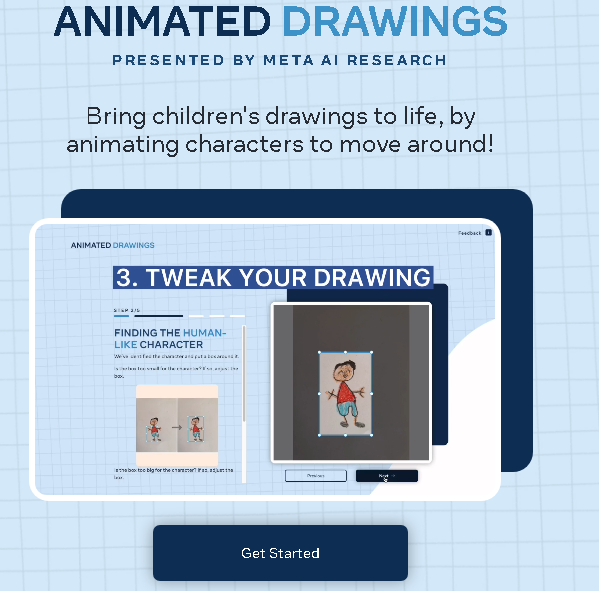
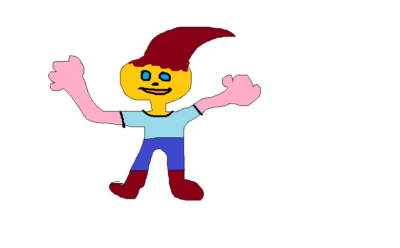
1.צייר דמות שלך ב Painter צייר דמות ראש ידיים רגלים שמור את התמונה
2.צפה בסרטון והשתמש באתר https://sketch.metademolab.com/canvas
הורד את הקובץ הבא
About the Author


