בינה מלאכותית RB108-4T : תרגיל בית
תרגיל 1 – מתקדם לימוד עצמי – הרצה בקולאב
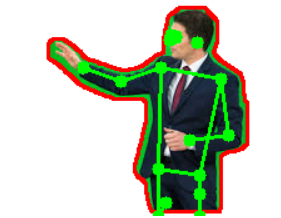
פלט:
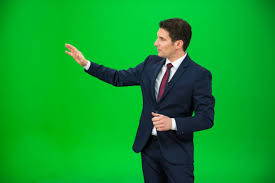
קלט :
נתון קוד הבינה מלאכותית הבא :
- למד בעצמך דרך A.I מה זה YOLO SEGMENTAION , בקש סרטון קישור
- למד בעצמך דרך A.I מה זה YOLO POSE בקש סרטון קישור
- מה זה A.I PIPELINE ?
- נתח בעזרת בינה מלאכותית LLM מה הקוד עושה , איזה מודלים של בינה מלאכותית משתתפים מה השלבים ?
- הרץ את הקוד ב COLAB איזה ספריות יש להתקין ? שים לה שהתוכנה מבקשת להעלות קובץ מהמחשב ל PC
- איזה פרמטרים ניתן לשנות בקוד ומה יהיה תפקיד כל פרמטר
- מתקדם – הוסף לקוד הקיים קוד – שימצא את מרכז המשא בין הכתפיים לאגן ויציג עיגול אדום קוטר 10 פיקסל
|
1 2 3 4 5 6 7 8 9 10 11 12 13 14 15 16 17 18 19 20 21 22 23 24 25 26 27 28 29 30 31 32 33 34 35 36 37 38 39 40 41 42 43 44 45 46 47 48 49 50 51 52 53 54 55 56 57 58 59 60 61 62 63 64 65 66 67 68 69 70 71 72 73 74 75 76 77 78 79 80 81 82 83 84 85 86 87 88 89 90 91 92 93 94 95 96 97 98 99 100 101 102 103 104 105 106 107 108 109 110 111 112 113 114 115 116 117 118 119 120 121 122 123 124 125 126 127 128 129 130 131 132 133 134 135 136 137 138 139 140 141 142 143 144 |
import cv2 import numpy as np import matplotlib.pyplot as plt from ultralytics import YOLO from google.colab import files from google.colab.patches import cv2_imshow # =========================================== # 1. Upload Image # =========================================== # Allows the user to upload an image from their computer into Colab. uploaded = files.upload() image_path = list(uploaded.keys())[0] print("Loaded:", image_path) # =========================================== # 2. YOLO Segmentation (person) # =========================================== # Load YOLO segmentation model and run it on the uploaded image. # The model returns masks (segmentation) + bounding boxes. seg_model = YOLO("yolov8x-seg.pt") seg_result = seg_model(image_path)[0] # Read the original image with OpenCV img = cv2.imread(image_path) h, w = img.shape[:2] # Image height and width # =========================================== # 3. Extract ONLY PERSON Mask # =========================================== # We iterate over all detected objects. # If the class is "person" (class ID 0), we take its segmentation mask. person_mask = None for box, mask_data in zip(seg_result.boxes, seg_result.masks.data): if int(box.cls.cpu().numpy()) == 0: # 0 = person person_mask = mask_data.cpu().numpy() break # If no person is found, stop the program. if person_mask is None: raise Exception("No person detected.") # Resize mask to match the original image resolution. mask = cv2.resize(person_mask, (w, h)) # Convert soft mask (0–1) to binary mask (0 or 255) mask_bin = (mask > 0.5).astype(np.uint8) * 255 # Optional: increase the mask thickness slightly (expands edges) mask_bin = cv2.dilate(mask_bin, np.ones((7, 7), np.uint8), iterations=1) # =========================================== # 4. Create Person Cutout (white background) # =========================================== # α-mask for blending foreground with white background. alpha = (mask_bin / 255.0)[..., None] # Create white background the same size as the image. white_bg = np.ones_like(img) * 255 # Blend the person with white background. cutout = (img * alpha + white_bg * (1 - alpha)).astype(np.uint8) # Save the result cv2.imwrite("cutout.png", cutout) # =========================================== # 5. Create Red Stroke Outline # =========================================== # Detect edges from the mask using Canny. edges = cv2.Canny(mask_bin, 50, 150) # Make edges thicker for a visible outline. edges_thick = cv2.dilate(edges, np.ones((3,3), np.uint8), iterations=1) # Draw stroke on the cutout cutout_stroke = cutout.copy() cutout_stroke[edges_thick > 0] = [0, 0, 255] # Red stroke # Image containing ONLY the red outline on white background stroke_only = np.ones_like(img) * 255 stroke_only[edges_thick > 0] = [0, 0, 255] cv2.imwrite("cutout_stroke.png", cutout_stroke) cv2.imwrite("stroke_only.png", stroke_only) # =========================================== # 6. YOLO Pose Detection # =========================================== # Load YOLO pose model and run it on the stroke image. pose_model = YOLO("yolov8x-pose.pt") pose_res = pose_model.predict(cutout_stroke)[0] pose_img = cutout_stroke.copy() # If keypoints were detected, draw them + draw skeleton lines. if pose_res.keypoints is not None: kpts = pose_res.keypoints.xy[0].cpu().numpy() # Draw green keypoints for x, y in kpts: cv2.circle(pose_img, (int(x), int(y)), 5, (0, 255, 0), -1) # COCO skeleton connections: pairs of keypoints skeleton = [ (5,7),(7,9), (6,8),(8,10), (11,13),(13,15), (12,14),(14,16), (5,6),(11,12), (5,11),(6,12) ] # Draw skeleton lines for a, b in skeleton: if kpts[a][0] > 0 and kpts[b][0] > 0: cv2.line( pose_img, (int(kpts[a][0]), int(kpts[a][1])), (int(kpts[b][0]), int(kpts[b][1])), (0, 255, 0), 2 ) cv2.imwrite("pose.png", pose_img) # =========================================== # 7. Display all main results # =========================================== print("Showing results:") cv2_imshow(cutout) cv2_imshow(cutout_stroke) cv2_imshow(stroke_only) cv2_imshow(pose_img) print("Saved: cutout.png, cutout_stroke.png, stroke_only.png, pose.png") |
